
Repair vs. Replace: When Is It Time for a New PC?

Your laptop is acting up. Maybe it’s running painfully slow. Maybe the battery dies in two hours. Maybe the screen is cracked, or it freezes at random, or it sounds like a small jet engine every time you open a browser. You’ve reached that uncomfortable moment every PC owner eventually faces: do I fix this thing, or is it time to just buy a new one?
It’s a bigger decision than it might seem. A good repair can give a perfectly capable computer five more years of life. But pouring money into the wrong machine can mean spending half the cost of a new PC on something that’s about to fail again.
Here’s how to think it through.
Start With the Age of the Computer
The age of your PC is the single biggest factor in the repair-vs-replace decision.
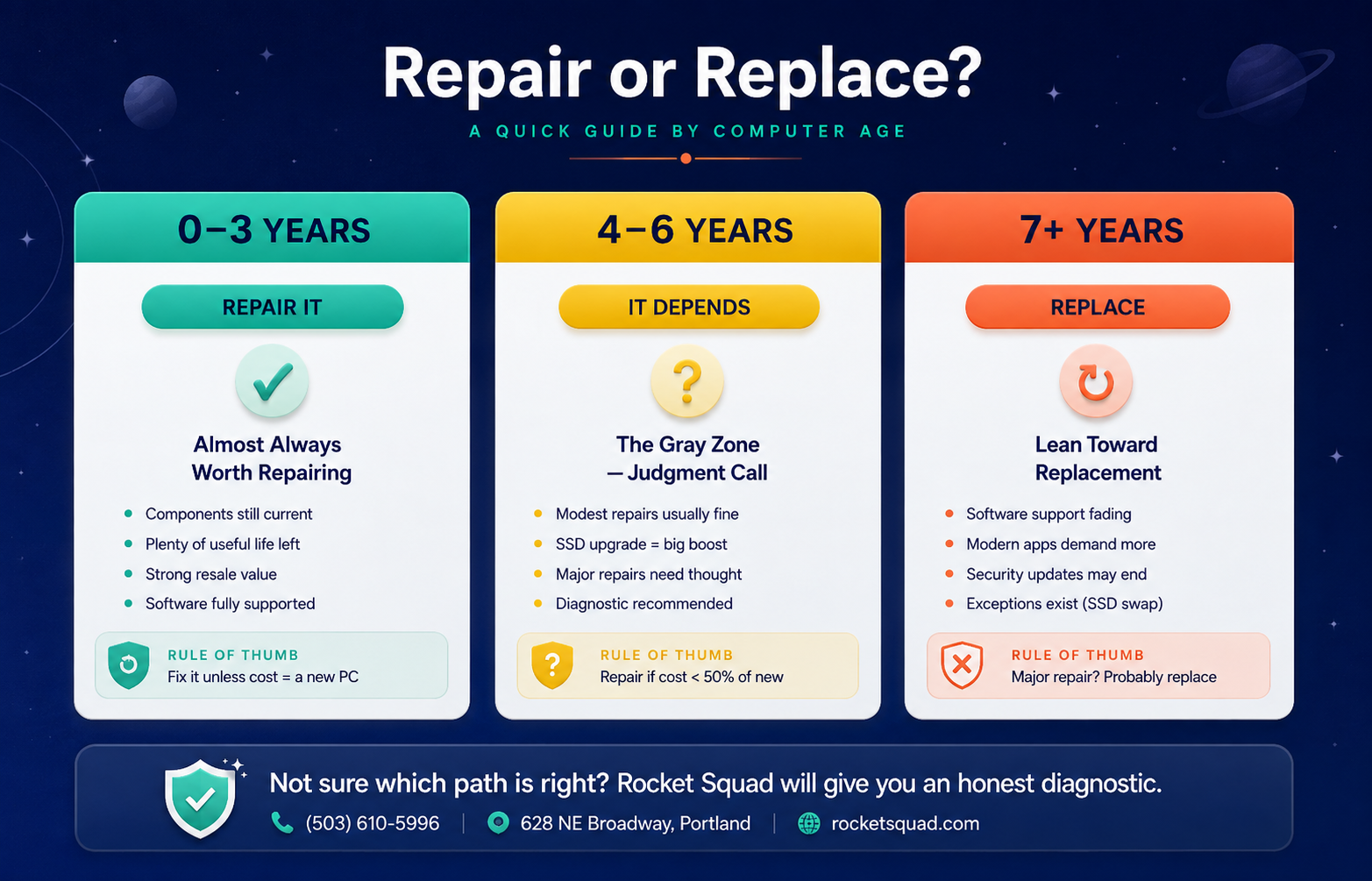
0–3 years old:
Almost always worth repairing. A computer this new is still well within its useful life. Components are current, software is supported, and the resale value of a working machine is significant. Unless the repair cost approaches the price of replacement, fix it.
4–6 years old:
This is the gray zone where individual judgment matters. The machine still has life left, but you’re closer to the end than the beginning. Repairs in this range usually make sense if they’re modest — battery, screen, RAM upgrade, SSD swap, virus cleanup. Bigger repairs deserve more thought.
7+ years old:
Replacement starts to make more sense, especially if the problem is major. Older PCs may be running outdated versions of Windows that no longer receive security updates, and modern software increasingly demands more memory and storage than older machines can provide. That said, there are exceptions — a sturdy old desktop that just needs an SSD upgrade can keep humming along beautifully for years.
Consider the Cost of Repair vs. Replacement
Here’s a useful rule of thumb: if a repair costs more than 50% of the price of a comparable new PC, replacement is often the smarter move.
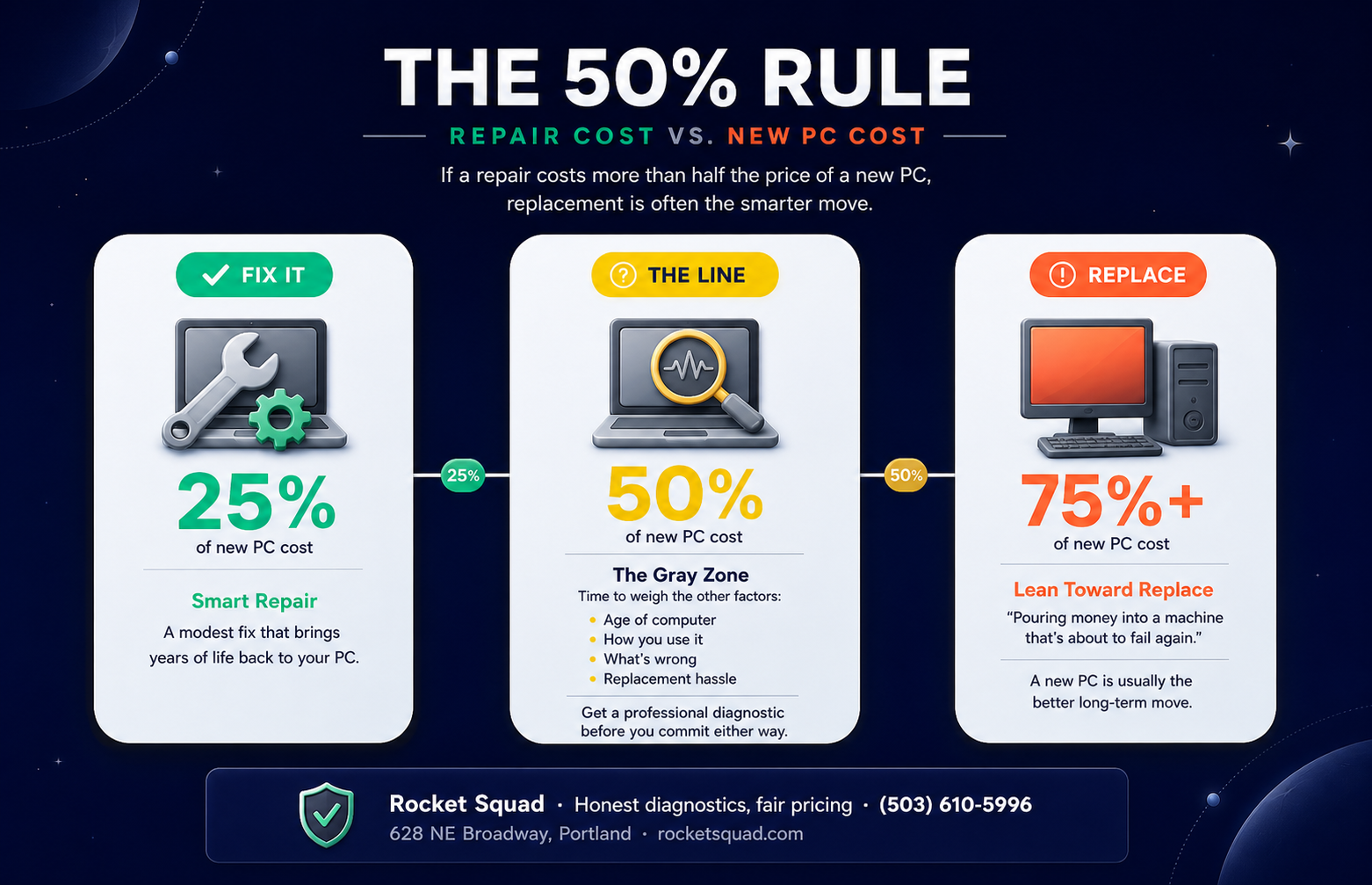
There are a few exceptions to this rule:
Specialty machines — gaming rigs, workstations, or professional setups — often have replacement costs much higher than typical consumer PCs, which shifts the math significantly toward repair.
Machines with important data that can’t easily be moved (specific software setups, licensed applications, complex configurations) may justify a higher repair investment.
Machines with sentimental or business value — your decade-old workhorse that holds years of work files, or a custom-built rig you’ve upgraded carefully over time — sometimes deserve a little more than the math alone would suggest.
What’s Actually Wrong? Some Problems Are Worth More Than Others
Not every problem carries the same weight. Some issues are simple, affordable fixes that genuinely revive a machine. Others are warning signs that bigger trouble is on the way.
Almost always worth fixing:
Cracked or broken laptop screen
Failing or dead battery
Slow performance from old hard drives (an SSD upgrade can transform a sluggish PC)
Virus or malware infections
Liquid damage caught early
Software issues, OS reinstalls, corrupted Windows installs
Loose hinges, broken keys, missing keyboard keys
Insufficient RAM
Worth a careful look:
Failing hard drive (the drive is replaceable, but the underlying cause sometimes points to bigger problems)
Repeated overheating (could be a simple cooling fix or a sign of bigger hardware fatigue)
Charging port issues (fixable, but the cost varies widely depending on the laptop)
Often signals it’s time to replace:
Motherboard failure (the repair cost on an older machine usually approaches the price of a new PC)
Multiple problems happening at once on an older laptop (when the screen, battery, AND hard drive all need attention simultaneously, that’s usually the machine telling you it’s done)
Significant water damage that’s been sitting for days
Repeated repairs in the same year on the same machine
Is the PC Still Doing What You Need?
This is the question most people overlook, and it’s one of the most important.
A computer that runs perfectly but can’t keep up with what you’re trying to do isn’t worth repairing — it’s worth replacing. If you’ve added video editing, gaming, design work, AI tools, or any other demanding tasks to your daily workflow since you bought the PC, the machine itself may have become the limitation. No repair can fix that.
Conversely, a PC that’s “slow” for browsing, email, and general productivity is often perfectly salvageable. The bottleneck is usually the hard drive or the amount of RAM, both of which are affordable upgrades that can make a five-year-old computer feel almost new.
Think about what you’re actually using the PC for, and whether the current machine can realistically do it well once repaired.
Don’t Forget What You’ll Lose by Replacing
There’s a hidden cost to replacing a computer that’s easy to overlook: the time and friction of starting over.
A new PC means transferring files, reinstalling software, re-licensing applications, recreating bookmarks and saved passwords, learning a new keyboard feel, and possibly relearning Windows if you’re jumping versions. Some of that is straightforward; some of it can take days or weeks to fully settle into.
A repair, by contrast, gets you back exactly where you were — with all your files, settings, and familiar environment intact.
This isn’t a reason to repair a hopeless PC. But it’s a real factor that deserves a seat at the decision-making table.
When You’re Truly Stuck Between the Two
If you’ve weighed everything and you still can’t decide, here’s the practical move: get a professional diagnostic before you commit either way.
A good repair shop will tell you honestly what’s wrong, what it costs to fix, and whether they’d recommend the repair or suggest replacement. That diagnostic is the single most valuable data point you can have, and it costs far less than guessing wrong.
If the diagnosis points to repair, great — you keep your machine and your data. If it points to replacement, you can buy a new PC with confidence, and a good shop can help you transfer your files, set up the new computer, and migrate your software so the transition is painless.
Either path can lead to a great outcome. The worst move is replacing a fixable PC out of frustration, or dumping money into one that’s beyond saving.
How Rocket Squad Helps With Both Paths
We see this decision come through our shop on NE Broadway in Portland every week. Whether the answer turns out to be repair or replacement, we can help.
If the answer is repair: We provide honest, upfront diagnostics so you know exactly what’s wrong and what the fix costs before any work begins. No surprises, no hidden fees, no pressure.
If the answer is replacement: We’ll help you transfer your files, set up your new PC, configure your email, install your software, and migrate your settings — either at the shop or in your home. The new computer should feel familiar from day one.
Sometimes we even recommend replacement when we genuinely think it’s the right call. We’d rather give you honest advice now than do a repair that doesn’t make sense for your situation.
Not Sure What to Do?
Drop by our shop on NE Broadway or give us a call. We’ll diagnose the issue, give you our honest take, and help you decide which way to go.
Schedule a Repair →
Request Home Support →
Call us at (503) 610-5996